
How to Unmute Acura Tlx
If your Acura TLX has gone silent, the fix is often simple. In many cases, you only need to check the mute button, volume knob, audio source, or phone connection to get sound back. This guide explains how to unmute Acura TLX models step by step, plus what to do if the issue is caused by settings, Bluetooth, or a system glitch.
How to Unmute Acura TLX
If you are trying to figure out how to unmute Acura TLX, you are not alone. It is one of those small problems that can feel big when your music, calls, or navigation stops making sound. The good news is that the fix is often simple. In many cases, the system is not broken at all. It is just muted, paused, or set to the wrong source.
The Acura TLX has a smart audio system, but that also means there are a few places where sound can get turned off. You may have hit the mute button by accident. Your phone may still be connected to Bluetooth but muted on the phone itself. Or the system may need a quick reset. In this guide, I will walk you through how to unmute Acura TLX in a clear and easy way.
We will cover the most common causes, the fastest fixes, and a few deeper checks if the sound still does not come back. If you want a simple answer to how to unmute Acura TLX, start with the first section and work your way down. Most drivers find the issue in just a few minutes.
Key Takeaways
- Point 1: The Acura TLX mute issue is often caused by a pressed mute button, low volume, or an audio source that is paused or disconnected.
- Point 2: You can usually unmute Acura TLX by using the volume knob, steering wheel controls, or the touchscreen audio settings.
- Point 3: Bluetooth calls, Apple CarPlay, and Android Auto can create sound problems if the phone or app is muted.
- Point 4: A quick system restart often clears small audio glitches and restores sound.
- Point 5: If the sound is still off, check balance, fade, source settings, and connected devices before assuming there is a hardware problem.
- Point 6: If your Acura TLX still will not unmute, a dealer or audio specialist may need to inspect the head unit or speakers.
📑 Table of Contents
- Why Your Acura TLX May Be Muted
- How to Unmute Acura TLX Using the Basic Controls
- How to Unmute Acura TLX When Using Bluetooth or CarPlay
- How to Unmute Acura TLX After a System Glitch
- Step-by-Step Fixes If the Acura TLX Still Has No Sound
- Tips to Avoid the Mute Problem in the Future
- When You Should Get Help
- Conclusion
Why Your Acura TLX May Be Muted
The mute button was pressed
The most common reason you need to unmute Acura TLX is also the easiest one. A mute button may have been pressed by accident. This can happen on the center console, on the steering wheel, or through the touchscreen audio controls. If mute is on, the screen may show a speaker icon with a line through it.
The volume is too low
Sometimes the car is not fully muted. The volume may just be turned all the way down. That can feel like a mute problem, but it is really a volume issue. If you are trying to learn how to unmute Acura TLX, always check the volume first. Turn the knob up slowly and listen for any sound.
Your phone or app is muted
If you use Bluetooth, Apple CarPlay, or Android Auto, the sound may be coming from your phone instead of the car. That means the phone itself, the app, or even the media player could be muted. This is very common during calls or when streaming music. The Acura TLX may be fine, but the connected device is not sending sound.
The audio source is paused or disconnected
Another common issue is a paused source. Maybe the radio is on, but your phone is not playing anything. Maybe Bluetooth disconnected for a second. Or maybe the system switched from one source to another. When that happens, it can seem like the Acura TLX is muted when it is really just waiting for audio.
How to Unmute Acura TLX Using the Basic Controls
Check the volume knob first
Start with the simplest fix. Turn the main volume knob clockwise. Do it slowly and listen for sound. If the volume was set too low, this alone may solve the problem. Some Acura TLX models also show the volume level on the screen, so you can watch it rise as you turn the knob.

Visual guide about How to Unmute Acura Tlx
Image source: netcarshow.com
Press the mute button once
If the system is muted, pressing the mute button again should restore sound. On many Acura TLX models, the mute function is tied to the volume knob or a nearby audio control. Press it once, then wait a second. If the sound comes back, you have found the issue.
Use the steering wheel audio controls
The steering wheel controls are another fast way to unmute Acura TLX. Look for the volume buttons and the source controls. Increase the volume and make sure no button is holding the audio in a muted state. If you are driving, this is often the safest and easiest place to fix it.
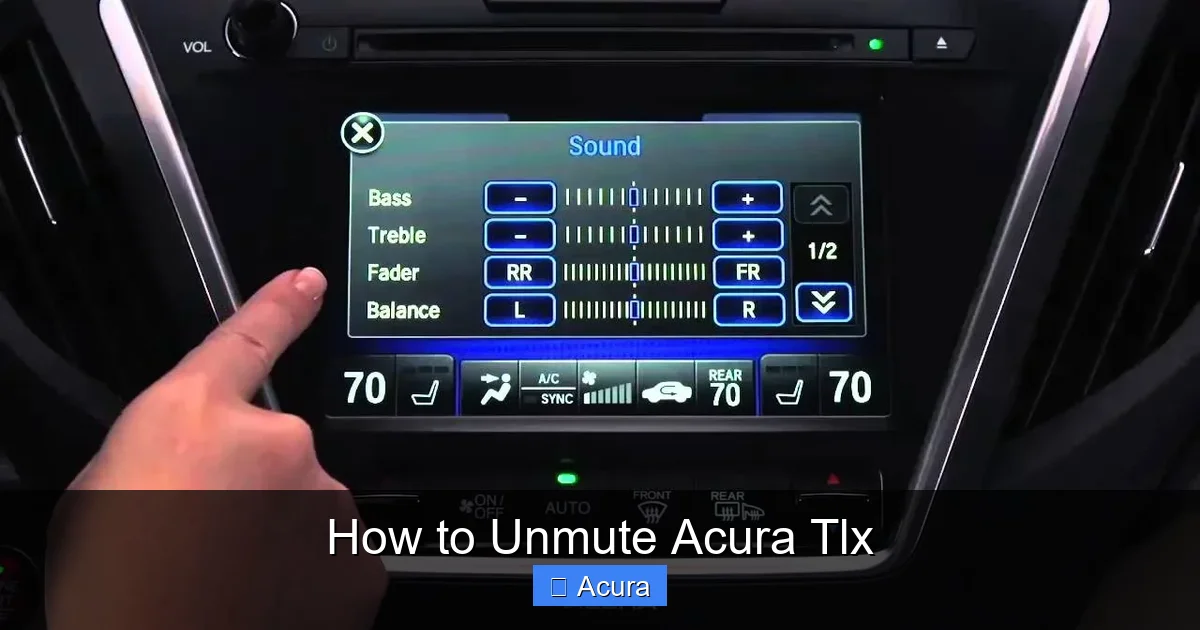
Check the touchscreen audio screen
Open the audio screen and look for a mute icon, speaker icon, or source status. Some Acura TLX models show the current source clearly. If the system is muted, tap the icon or adjust the audio setting. This is also a good time to confirm that the correct source is playing.
If you are dealing with another Acura issue related to power or access, you may also find this guide useful: how to put an Acura TLX in neutral with a dead battery.
How to Unmute Acura TLX When Using Bluetooth or CarPlay
Check your phone volume
When your phone is connected, the Acura TLX may play sound from the phone’s media output. If your phone volume is low or muted, the car may seem silent. Turn up your phone volume while music or a call is active. Also make sure the phone is not in silent mode if that affects app audio.

Visual guide about How to Unmute Acura Tlx
Image source: motortrend.com
Make sure the app is playing sound
Streaming apps can pause, buffer, or mute themselves. Open the app and confirm that something is actually playing. If you are using a podcast app, video app, or music app, tap play and raise the app volume. This is a very common fix when people try to unmute Acura TLX after pairing a phone.
Reconnect Bluetooth
If the sound still does not work, disconnect and reconnect Bluetooth. You can do this by turning Bluetooth off on the phone, waiting a few seconds, and turning it back on. You can also remove the phone from the Acura TLX Bluetooth list and pair it again. A fresh connection often clears weird sound problems.
Check CarPlay or Android Auto settings
If you use Apple CarPlay or Android Auto, the problem may be in the phone projection system. Make sure your phone is unlocked, the cable is firm if you are using a wired connection, and the app has audio permission. If one app is muted, switch to another source and then return to it. That can wake the system back up.
If your issue is really with the key fob or remote access, this related guide may help: how to change battery in a 2021 Acura RDX key fob.
How to Unmute Acura TLX After a System Glitch
Restart the audio system
Sometimes the Acura TLX audio system just needs a reset. Turn the car off, open the driver door, wait a minute, and start it again. This can clear a small software glitch. If the audio comes back after the restart, the system likely froze in a muted state.
Visual guide about How to Unmute Acura Tlx
Image source: headlight.news
Switch audio sources
Try moving from Bluetooth to radio, or from radio to USB. Then switch back. This simple action can force the system to refresh. If one source is stuck, another source may work right away. It is a good test when you want to unmute Acura TLX without changing settings too much.
Look for balance and fade issues
If you hear sound from only one side, the system may not be muted at all. The balance or fade may be set too far left, right, front, or rear. Open the audio settings and return them to the center. This will not fix a true mute issue, but it can solve a “no sound” complaint that feels similar.
Check for system updates
Some Acura TLX models can receive software updates that improve the infotainment system. If your audio keeps acting strange, check whether your car needs an update. A software bug can cause sound problems, frozen screens, or a mute state that does not clear right away.
Step-by-Step Fixes If the Acura TLX Still Has No Sound
Test every audio source
Try FM radio, AM radio, Bluetooth audio, USB audio, and navigation prompts if available. If one source works and another does not, the problem is not the whole system. It may just be one input or one connected device. That helps narrow down how to unmute Acura TLX the right way.
Check the speakers with a simple test
Raise the volume a little and listen closely. Do you hear any static, clicks, or sound from one speaker only? If yes, the system may not be muted. It may have a speaker or wiring issue. If you hear nothing at all from any source, the problem is more likely in the head unit or settings.
Inspect the fuses if needed
If there is no sound from any source and the system will not respond, a fuse could be part of the problem. Check your owner’s manual for the correct fuse location. If you are not sure, ask a professional. A blown fuse can stop the audio system from working the way it should.
Do a full vehicle restart
Park safely, turn the car off, open and close the door, then restart it. This may sound too simple, but it often works. Many electronic systems in modern cars respond well to a clean restart. If your Acura TLX was stuck in mute mode because of a temporary glitch, this may clear it.
For more Acura help, you may also want to read about how to put an Acura MDX in neutral with a dead battery.
Tips to Avoid the Mute Problem in the Future
Keep track of your last audio setting
If you often switch between radio, Bluetooth, and CarPlay, it helps to remember what was playing before you parked. That way, when you start the car again, you can spot a change faster. If the Acura TLX seems muted, you will know whether the problem is new or just a source issue.
Be careful with steering wheel buttons
It is easy to hit a button by accident while turning, parking, or adjusting your grip. A quick press can mute the system without you noticing. If you often ask how to unmute Acura TLX, take a second to learn the button layout. That small habit can save time later.
Keep your phone volume in sync
When you use your phone with the car, keep the phone volume at a normal level. If it is too low, the Acura TLX may seem silent even when the system is fine. Before you drive, check your media volume and call volume. That makes the whole setup more reliable.
Restart problem apps now and then
If a music app or navigation app keeps acting strange, close it and reopen it. Apps can freeze just like car systems can. A fresh start helps both sides. This is a simple habit that can prevent many sound problems before they begin.
When You Should Get Help
Sound never comes back
If you have tried the basic steps and still cannot unmute Acura TLX, the issue may be deeper than a simple setting. A damaged speaker, bad fuse, head unit fault, or software problem may need expert help. At that point, a dealer or car audio technician is the best next step.
The screen freezes often
If the infotainment screen freezes, reboots, or acts slow, the mute issue may be part of a larger system problem. That usually means the car needs a proper diagnostic check. Do not keep pressing random buttons if nothing changes. You could make it harder to spot the real issue.
You hear distortion or crackling
Distortion is not the same as mute, but it can happen around the same time. If the sound is weak, broken, or crackling, the audio system may have a hardware issue. A technician can test the speakers, amplifier, and wiring to find the fault.
If you are also dealing with battery-related access issues on another Acura model, this guide may be useful: how to change the battery in a 2021 Acura RDX key fob.
Conclusion
Learning how to unmute Acura TLX does not have to be stressful. In most cases, the fix is simple. Check the mute button, raise the volume, confirm the correct source, and make sure your phone or app is not muted. If that does not work, restart the system and test each audio source one by one.
The key is to stay calm and work through the easy steps first. Most sound problems in the Acura TLX come from settings, not damage. Once you know where to look, you can usually get your audio back in just a few minutes. And if the problem does turn out to be hardware or software related, you will already know what you have checked before asking for help.
Frequently Asked Questions
How do I unmute Acura TLX quickly?
Start by pressing the mute button once and turning the volume knob up. If that does not work, check the touchscreen audio screen and make sure the correct source is active. Most mute issues are fixed in less than a minute.
Why is my Acura TLX silent but the volume is up?
This usually means the problem is not the main volume. It could be Bluetooth, CarPlay, a paused app, or a system glitch. Try switching audio sources and restarting the car.
Can my phone cause the Acura TLX to seem muted?
Yes, it can. If your phone media volume is low or the app is muted, the car may not play sound even if the Acura TLX is working fine. Check your phone volume and the app before assuming the car has a problem.
What if only one speaker works in my Acura TLX?
That usually points to balance or fade settings, not a mute problem. Open the audio settings and center the sound. If that does not help, there may be a speaker or wiring issue.
Will restarting the Acura TLX fix the mute issue?
Often, yes. A restart can clear small software glitches and restore sound. Turn the car off, wait a moment, and start it again to see if the audio returns.
When should I take my Acura TLX to a dealer?
Take it in if none of the basic steps work, the screen keeps freezing, or the sound crackles or cuts out. That may mean there is a deeper audio or software problem that needs professional diagnosis.


